
With such a wide range of projectors available on the market, choosing the right one can feel overwhelming. New models are released every year, offering updated features, smarter technology, and improved picture quality. However, while the products themselves may change, the key factors to consider when buying a projector remain largely the same. Understanding these fundamentals will help you make a confident decision and ensure you invest in a model that suits your space and viewing preferences.
That’s why we’ve created this comprehensive projector buying guide — to walk you through the essential elements that really matter. From brightness and resolution to throw distance, connectivity, and installation, we’ll break down what each term means and why it’s important. Whether you’re setting up a dedicated home cinema or upgrading your living room setup, this guide will help you find the perfect projector for your entertainment needs.
Buying factors:
- Types of projectors
- Resolution
- Light Source
- Lumens
- Throw ratio
- Connectivity
- Installation
- Setup
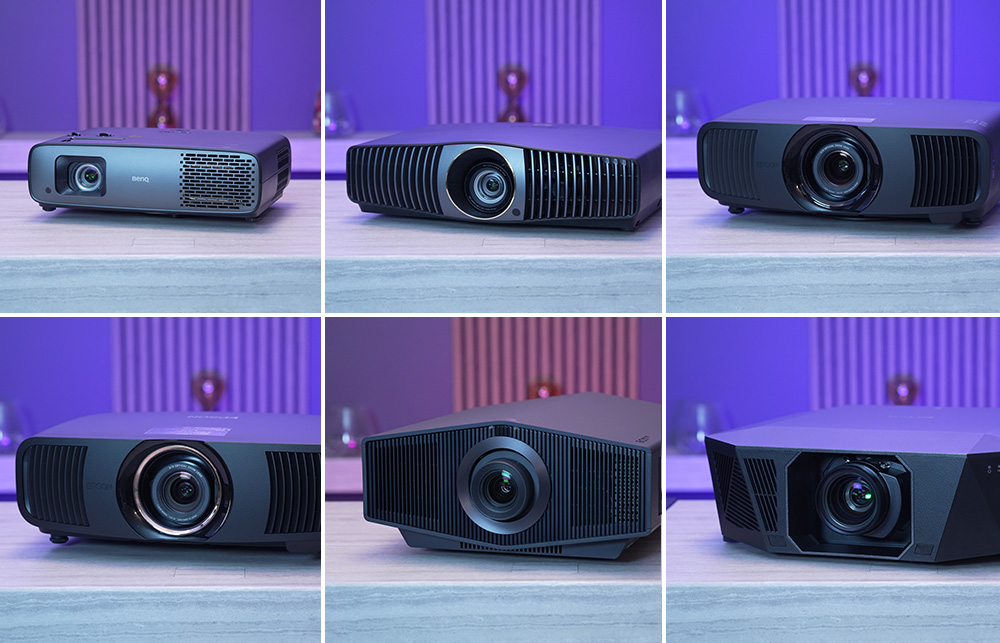
Types of projectors
There are lots of different types of projectors on the market mostly you will see these defined by the 'throw'
Long Throw Home Cinema Projectors
A long throw or standard throw home cinema projector allows you to enjoy the full cinematic experience in the comfort of your own home. Capable of displaying stunning Full HD or 4K resolution, these projectors deliver exceptional clarity, vibrant colour, and deep contrast — ideal for watching movies, TV shows, and live sports on the big screen. Unlike traditional televisions, a home cinema projector can create an image that’s 100 inches or more in size, giving you that authentic theatre feel without leaving your sofa.
Designed specifically for film and entertainment, these projectors are built to handle the nuances of movie content, from rich blacks in shadowed scenes to the bright highlights of on-screen action. Many modern models also include HDR (High Dynamic Range) support, improved brightness, and enhanced colour accuracy for a more immersive visual experience. Whether you’re designing a dedicated cinema room or upgrading your living space, a home cinema projector brings the magic of the movies to life.
Ultra Short Throw Projectors
Ultra Short Throw (UST) projectors have wide-angle lens and incredibly low throw ratio (typically less than 0.4), UST projectors can be placed just a few inches from the wall or screen, yet still produce a massive, sharp image. This makes them an excellent choice for anyone who wants a cinematic setup without any real installation work. Home Cinema projectors
Because of their sleek design and simple placement, UST projectors are often referred to as Laser TVs. They use powerful laser light sources for bright, vibrant images and long-lasting performance. Many models come with built-in speakers, smart TV functionality, and sleek aesthetics that blend seamlessly into modern living rooms. A UST projector offers the perfect combination of convenience and quality — delivering a true home cinema experience with minimal setup and maximum visual impact.
Resolution
An important factor when buying a projector is of course resolution. So what resolutions are on the market and what do they mean?
Full HD (1080p)
This is Full HD or known as 1080p is the modern standard which all devices you link to output at and anything less is going to look worse than say a tablet or your monitor. The shape is 16:9 which again replicates modern tablets or monitors, allowing more to be shown as a widescreen image.
4K UHD (E Shift)
4K UHD projectors use technology called pixel shifting. This technology essentially overlays two HD images on top of each other shifted by a half a pixel so quickly the naked eye can’t detect it. This gives the appearance of 4k without the higher price tag.
Native 4k (4096 x 2160)
Native 4k projectors are those that offer true 4K resolution which is over 8 million pixels. These projectors will offer you fantastic picture quality. The problem however is that Native 4K projectors start at around 5k.
To get the best quality you will be wanting to invest in a projector that has 4k capabilities so we would suggest going for either a 4K UHD or Native 4k projector. Many people who we speak to can barely tell the difference between native 4k and E Shift. Often opting for Eshift as the lower price frees up budget to improve the sound system in the room or to add in concealment features like a projector lift.
Light source
One of the key differences between projectors on the market today is the type of light source they use. Traditionally, projectors relied on lamp-based systems, but as technology has advanced — and mercury bulbs have become obsolete — laser and LED light sources have taken the lead. These modern alternatives offer greater efficiency, improved colour performance, and longer lifespan, making them the preferred choice for most new home cinema models.
Lamp projectors once dominated the market due to their affordability, but they typically require bulb replacements after several thousand hours of use and can take time to warm up. Laser projectors, by contrast, deliver instant brightness, consistent performance, and up to 20,000 hours or more of operation with minimal maintenance. They also tend to produce superior colour accuracy and contrast, which makes them ideal for movie enthusiasts. LED projectors sit somewhere in between — they offer excellent energy efficiency and longevity, though they may not reach the same brightness levels as high-end laser units.
Because image quality and brightness perception can vary between light source types, the best way to determine which projector suits your needs is to see them in action. Visiting a specialist retailer, like Pure Theatre, that offers live demonstrations allows you to experience the differences first-hand — from colour tone and black levels to overall brightness and image sharpness. Seeing these projectors side by side is the most reliable way to choose the one that feels right for your space and your style of viewing.
Lumens
The brightness of a projector, also called light intensity, is measured in lumens. Lumens indicate how much light a projector can produce, which directly affects how bright and clear the image will appear on your screen. The brighter the ambient light in the room — from windows, lamps, or overhead lighting — the more lumens your projector will need to maintain a crisp, vibrant image.
For a typical home cinema setup in a living room with some ambient light, we generally recommend a projector with at least 2,000 lumens. This ensures that movies, TV shows, and games remain bright and detailed, even when the lights aren’t fully dimmed. For rooms with large windows or lots of natural daylight, higher-lumen models (3,000–4,000 lumens or more) may be preferable to prevent the image from looking washed out.
It’s also worth noting that the perceived brightness can be affected by screen size and type. Larger screens or lighter-colored walls may require more lumens to maintain the same image quality, while darker screens can make a lower-lumen projector appear brighter. Considering these factors together will help you choose a projector that performs perfectly for your space and viewing preferences.
Throw Ratio
Throw ratio is the relation between the throw distance (the distance between the projector's lens and the projected image) and the width of the projected image:
Throw Ratio = Throw Distance / Image Width
Throw Ratio tells us what image size we can project from a certain distance away. For instance, a throw ratio of 1.5 indicates that for every 1 foot of image width, the throw distance must be 1.5 feet. The smaller the throw ratio, the larger the image a projector will produce at a shorter throw distance.
So when buying a projector the throw ratio is important as it will dictate what size screen you will be able to choose based on where your projector will be mounted.
Connectivity
One of the key considerations when choosing a projector is connectivity — making sure you can watch all of your favourite programs and play your games without hassle. Most modern projectors come with multiple HDMI ports, which allow you to connect a wide range of devices, including streaming boxes, gaming consoles, Blu-ray players, and more. Some models also include USB ports, Wi-Fi, or even Bluetooth support for additional versatility.
Depending on your setup and viewing preferences, it’s often advantageous to include an AV receiver in your home cinema system. The AV receiver acts as the central hub for all your devices, simplifying connections and reducing clutter. With this setup, you only need one Ultra High Speed HDMI cable between the projector and the receiver. All your other devices — whether it’s a Sky box, Apple TV, Xbox, PlayStation, or streaming sticks — connect directly to the AV receiver.
This arrangement not only streamlines your setup but also allows for better audio management, as the AV receiver can handle surround sound, volume control, and audio processing for a fully immersive home cinema experience. By planning your connectivity around an AV receiver, you can future-proof your system, easily add new devices, and enjoy a neat, organized setup without constantly swapping cables.
Installation
You will also want to consider how you are going to install your projector. Unlike other technology projectors have actually increased in size as time has gone on. This means that many high end projectors are now rather large.
Whilst purchasing your projector you could look to get a device specific mount from the manufacturer or look at a motorised projector lift which recesses it into the ceiling so it can hide away.
Setup
Setting up a projector can vary greatly depending on the model and your room, but there are certain features that make the process much easier and more flexible. Planning your setup in advance can save a lot of time and frustration while ensuring the best possible image quality.
Motorised Lens: If you’re mounting your projector on a ceiling or in a lift system, a motorised lens is a game-changer. It allows you to adjust focus, zoom, and lens shift remotely, rather than having to manually tweak the lens. This not only makes installation simpler but also allows you to make quick adjustments if the projector is moved or if you change the screen size.
Lens Shift: Lens shift refers to the projector’s ability to move the image vertically and horizontally without physically moving the projector. This is especially useful if your projector cannot be perfectly centered with your screen or if you have a non-standard screen placement. By using lens shift, you can ensure the projected image lines up precisely with the screen, avoiding distorted or off-center pictures.
Other setup considerations include keystone correction, which adjusts the image if the projector is slightly tilted, and throw distance, which determines how far the projector needs to be from the screen to achieve the desired image size. Paying attention to these features will make installation smoother, provide flexibility in room layout, and ensure your home cinema looks and performs at its best.